AI YouTube Video Analyzer for Faster, Smarter Watching

Use our AI YouTube Video Analyzer to summarize videos, detect clickbait, review transcripts, and decide what is worth watching before you spend your time.
A Client Logo Image
A Client Logo Image
A Client Logo Image
Save Time Before You Commit to a Video
Every minute you don’t waste on bad videos is a minute you can use to learn, create, or relax. IsThisClickbait keeps your watch time focused.
250+
Hours of watch time saved
40+
Creators using Clickbait detector daily
3x
Faster video review

See the YouTube Video Analyzer in Action

A Feature Image
Instant Video Insights While You Browse YouTube
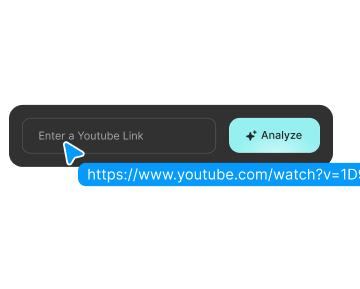
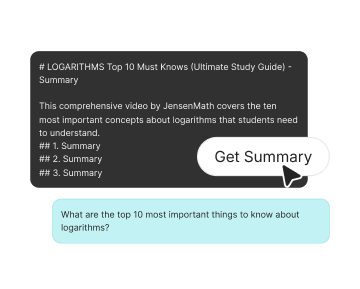
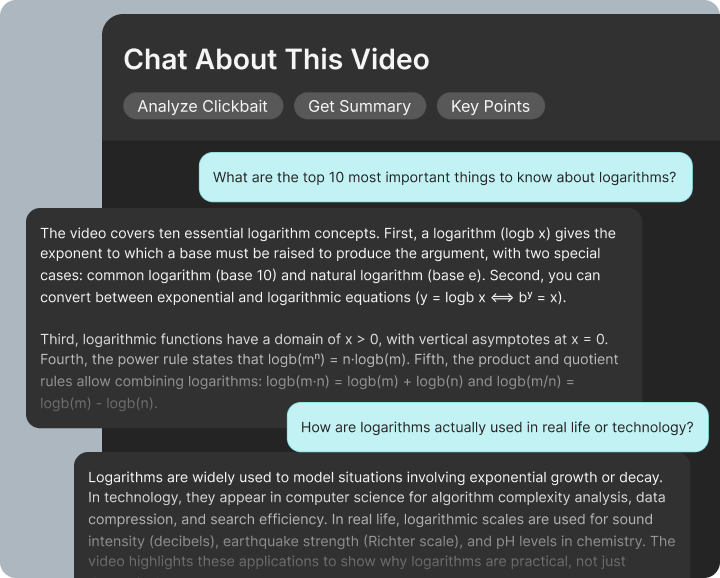
Open any YouTube video and let our Video Analyzer break it down in seconds. Review the summary, clickbait signals, key points, and watch value without wasting time on the wrong content.
A Feature List Icon Image
Get a clear summary of the video in simple language.
A Feature List Icon Image
Check clickbait signals with reasons behind the score.
A Feature List Icon Image
Scan key points, timestamps, and important moments fast.
A Feature List Icon Image
Decide whether to watch now, save for later, or skip it.

How our YouTube Video Analyzer Extension Fits Into Your Viewing Flow

When a video looks interesting, the extension helps you check it faster.
See the summary, main takeaways, and watch value before
deciding to watch, save, or skip.
Features Icon
Install and Keep It Ready
Add the extension to your browser once and use it whenever a video catches your attention.
Features Image
Features Icon
Check the Video While You Browse
Open any YouTube video and launch the analyzer right from your browser without breaking your flow.
Features Image
Features Icon
Review Before You Commit
Get a summary, spot possible clickbait, and scan the main takeaways so you can decide what deserves your time.
Features Image

Works Across Your Favourite Browsers

IsThisClickbait works where you already watch videos. Open YouTube and the extension is right there. Available on Chrome, Edge, Brave, Opera, Arc, and more, it gives you the same AI YouTube Video Analyzer across your devices with one install.
logologologologologologologologologologologologo

Everything You Need to Analyze YouTube Videos Faster

Features Icon
Video summary in seconds
Turn any long video into a quick, readable summary. See what the creator covers, which parts matter, and where to skip ahead - all powered by our YouTube video summary tool.
Features Icon
Clickbait detector with context
Our AI compares the title, thumbnail, and transcript to see if the promise matches the content. Get a clear clickbait score plus a short explanation, so you know why a video is flagged.
Features Icon
Smart time-saver
Preview the main ideas and length impact so you can decide if the full video is worth your time.
Features Icon
Ask custom questions
Chat with the video: ask about a section, a quote, or a concept, and get answers pulled from the content.
Features Icon
Adaptive video intelligence
Scalable analysis that handles any format or length, delivering precise results no matter how complex the content.

Match Features to
Your
Needs

Compare all plans
Basic
$10/month
For individuals who want a faster way to check a few videos each week.
Select Plan
Select Plan
Pro
$20/month
For active learners and creators who rely on AI summaries every day.
Select Plan
Select Plan
Premium
$35/month
For serious creators and small teams who analyze lots of content and want deeper controls.
Select Plan
Select Plan
Enterprise
$75/month
For companies, schools, and publishers that need advanced controls, more seats, and priority support.
Select Plan
Select Plan
Monthly Tokens
1.4M
3.1M
5.6M
14M
Analyses / Summaries per Month
200+ quick answers
70+ detailed analyses
30+ long-form analyses
75+ full analyses
Ideal for
Casual readers
Busy readers & podcast listeners
Heavy podcast users
Teams & power users
Smart Default Model
A Pricing List Icon
A Pricing List Icon
A Pricing List Icon
A Pricing List Icon
AI Model Switching (Claude, OpenAI, Gemini)
A Pricing List Icon
A Pricing List Icon
A Pricing List Icon
A Pricing List Icon
Priority Support
-
-
A Pricing List Icon
A Pricing List Icon
Team Members
1
1
6
10+
Usage Scale
Core usage
2.2x Basic
4x Basic
10x Basic

All plans include our core AI tools: video summaries, clickbait detector, and browser extension access.

Trusted by Students, Researchers, and Everyday Viewers

A Rating Icon
“Instead of wasting 30 minutes on every ‘guru’ video, I skim the AI summary and only watch what’s actually useful.”
Mia R.
YouTube learner
A Rating Icon
“I use IsThisClickbait to check my own titles too. It keeps me honest and helps me write hooks that are strong but not misleading.”
Jordan K.
Content creator
A Rating Icon
“As a teacher, I love the clickbait detector. My students see how titles can twist the truth, then we look at the summary together.”
Alex P.
Media Literacy Teacher
A Rating Icon
“Game changer for long podcasts and interviews. I get the key points, then jump straight to the parts I care about.”
Sam L.
Podcast fan
A Rating Icon
“I leave IsThisClickbait open all day. It filters out the junk so I only watch videos that actually teach me something.”
Noah S.
Software developer
A Rating Icon
"Exceptional work by Zencrate—professional, innovative, and truly dedicated to success."
A Clients Image
Valentine Alagnat
Purshasing Manager
A Rating Icon
"Zencrate exceeded every goal with precision and creativity. A perfect partner!"
A Clients Image
Valentine Alagnat
Purshasing Manager
A Rating Icon
"Exceptional work by Zencrate—professional, innovative, and truly dedicated to success."
A Clients Image
Valentine Alagnat
Purshasing Manager
A Rating Icon
"Zencrate exceeded every goal with precision and creativity. A perfect partner!"
A Clients Image
Valentine Alagnat
Purshasing Manager
A Slider Arrow Icon
A Slider Arrow Icon

Frequently Asked
Questions

01
What does IsThisClickbait do?
IsThisClickbait helps you understand what a YouTube video is really about before you watch it. It gives you a short summary and a quick check on whether the video feels honest or overly hyped, so you can spend less time on weak content. It is built to make video review faster, easier, and more useful right inside YouTube.
02
How do I use IsThisClickbait?
You install the IsThisClickbait browser extension, log in, and use YouTube like normal. When you open a video, click the IsThisClickbait icon and a side panel appears with the summary, key points, and checks. You can also right click any YouTube link to analyze it instantly, or paste a link into app.isthisclickbait.com if you want to use the web app instead.
03
Do I need any special skills to use IsThisClickbait?
No. If you can install a browser extension and click a button, you can use IsThisClickbait. The AI handles the hard part in the background, so you can quickly review the summary and decide whether to watch, skim, save, or skip the video.
04
What kind of videos does it work best on?
IsThisClickbait works best on videos that explain, teach, review, or break down a topic. That includes tutorials, how to videos, lectures, product reviews, interviews, and deep dives. If a transcript is available, IsThisClickbait can usually turn the video into clear points you can scan in seconds.
05
Is IsThisClickbait only an extension, or is there a web version too?
The extension is the main way people use IsThisClickbait because it works directly inside YouTube. There is also a web app where you can paste links and manage videos in one place. The goal stays the same in both: fast summaries, useful insights, and a simple way to judge whether a video is worth your time.
06
Will IsThisClickbait change how YouTube looks or works?
Not much. YouTube still works the way it normally does. IsThisClickbait simply adds a side panel when you click the icon, so you can view the summary and checks next to the video. If you do not open it, your usual YouTube experience stays the same.
Need more information?
Our support team is ready to answer any additional questions you might have
Contact Us
Contact Us